Planning using constraints
In this section, a detailed description of the key components that constitute the developed constraint-based motion planning framework is provided. Each component plays a critical role in the definition, management, and execution of constraints within the planning process.
The Kautham Constraint class inherits from the ompl::base::Constraint class and provides additional functions that allow users to define new, customizable con- straints with minimal programming effort. In particular, some of the properties users can customize are:
The constrained joints. These are the joints that will be used to satisfy the defined constraints. These joints must be consecutive joints of a kinematic chain and the joints that precede them must not belong to the set of controlled joints, i.e., the transform between the robot base frame and the link prior to the first constrained joint is considered fixed.
The target link. It specifies the robot link to which the constraint is applied. The target_link at least must correspond to the last link actuated by a constrained joint or to a subsequent link in the kinematic chain provided that none of the joints located between the last constrained joint and this link is a controlled joint, i.e., the transform between the last link actuated by a constrained joint and the target_link must be fixed.
The constraint logic. This logic is implemented by overriding the function() method in the ompl::base::Constraint class. This function en- codes the constraint and defines the conditions under which it is considered satisfied. In particular, if the constraint is represented by a function f : C → Rn , where C denotes the configuration space of the robot and Rn is an n-dimensional vector space, then the constraint is considered fulfilled whenever f (q) = 0.
The dynamic tolerance. To introduce flexibility into the problem, the Kautham Constraint class provides an enhanced mechanism for specifying the constraint tolerance by allowing the use of dynamic tolerance values. Specifically, the tolerance can be defined as a function of the translational distance between the current and goal positions of the target_link in the three- dimensional Euclidean space. This dynamic tolerance is characterized by a nominal value, which applies at the goal, and a gradient that increases the allowable tolerance as the distance from the goal position increases. This formulation results in a spherical region centered at the goal position of the target_link, within which the constraint becomes progressively stricter as the end- effector approaches the goal, ultimately restricting to the nominal tolerance value at the target position.
Implemented Kautham Constraints
In Kautham, a set of predefined constraints has been imple- mented, each accessible through a unique type tag identifier. When Kautham constructs the internal representation of the problem, it automatically loads the requested constraint from the Constraint Factory, where all implemented con- straints must be defined and associated with their respective type tag identifier. They are the following:
Orientation constraints
Defined to enforce that the end-effector maintains a desired orientation, defined relative to the robot’s base link, throughout the motion planning process. This is achieved by computing the rotational error between the current and target orientations. The allowable tolerance for this error can be dynamically adjusted based on the distance to the goal, if specified. In addition, this type of constraint supports selective enforcement along specific axes defined in the target link frame; that is, instead of applying the constraint to all three orientation components, it can be limited to one or two. This approach enables more flexible control of the end-effector’s orientation, allowing constraints to be tailored to the requirements of specific orientation-related tasks.
Geometric constraints
Defined to enforce that the robot’s end-effector position remains within (or outside) a specified geometric region, expressed (as shown in the next image) relative to the base link of an obstacle in the environment, throughout the motion planning process. For each geometric constraint, the algorithm evaluates the extent to which the current pose violates the geometric boundary.
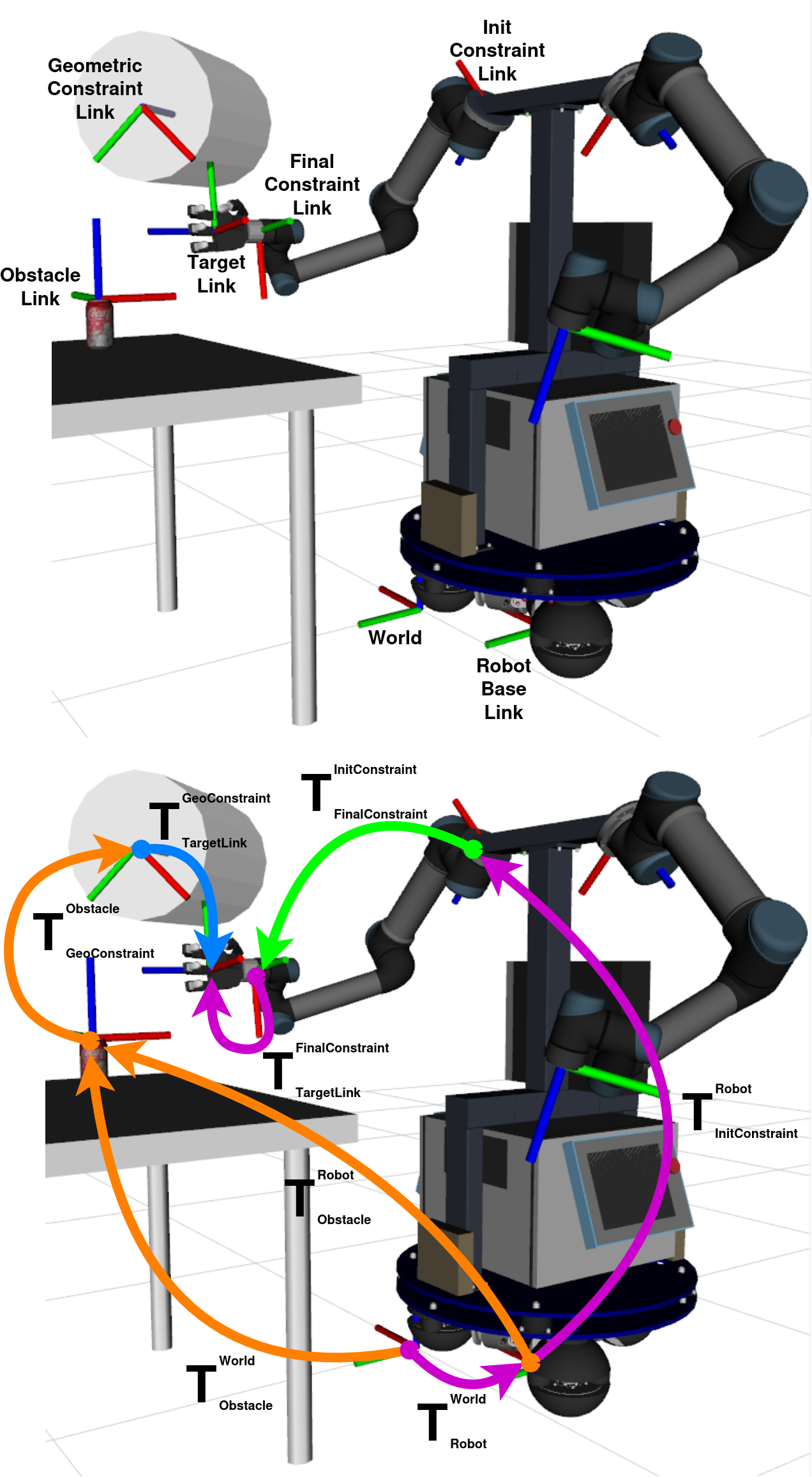
Several types of geometric constraints have been implemented. They can be described as follows, assuming the “within” formulation:
Box constraint
The end-effector must remain inside a box of dimensions \((l, w, h)\), which is encoded by the function \(f = (f_{\text{length}}, f_{\text{width}}, f_{\text{height}})\), with:
where \((x, y, z)\) are the coordinates of the end-effector’s position, when the robot is at configuration \(\mathbf{q}\), expressed with respect to the reference frame located at the box center.
Sphere constraint
The end-effector position must remain inside a sphere of radius \(r\), which is encoded by the function \(f\):
where \(\|p(\mathbf{q})\|\) is the Euclidean distance between the end-effector’s position, when the robot is at configuration \(\mathbf{q}\), and the origin of the sphere.
Cylinder constraint
The end-effector must remain within a cylinder of radius \(r\) and height \(h\), which is encoded by the function \(f = (f_{\text{radius}}, f_{\text{height}})\), with:
where \((x, y, z)\) are the coordinates of the end-effector’s position when the robot is at configuration \(\mathbf{q}\), expressed with respect to the cylinder’s reference frame, which is located at one of its bases with the \(z\)-axis aligned with the height and pointing towards the cylinder’s interior.
Cone constraint
The end-effector must remain within a cone of height \(h\) and base radius \(r\), which is encoded by the function \(f = (f_{\text{radius}}, f_{\text{height}})\), with:
where \(R_{\max} = \frac{z}{h} r\), \(R = \sqrt{x^2 + y^2}\), and \((x, y, z)\) are the coordinates of the end-effector’s position, when the robot is at configuration \(\mathbf{q}\), expressed with respect to the reference frame located at the cone apex with the \(z\)-axis aligned with the height and pointing towards the cone’s interior.
Constraints combination
The OMPL library provides the class ompl::base::ConstraintIntersection, which allows multiple constraints to be combined into a single composite constraint. This composite constraint is satisfied only when all individual constraints are simultaneously satisfied.
Kautham automatically manages the combination of constraints by grouping them according to their constrained joint names. This grouping ensures that only constraints affecting the same set of joints are combined.
When multiple constraints are defined in a single robot, without the intention to be combined, it is not possible to involve the same joint names across different constraints, unless the entire set of joints is identical for those combined constraints. This restriction ensures that each joint is subject to only one constraint within any given combination or set, thereby avoiding conflicts during the motion planning.
How to use Kautham Constraints
When defining a motion planning problem, some constraints can be included and assigned to a robot by defining them in the Kautham problem file within the robot’s XML tag, as illustrated in the following examples.
Example of an orientation constraint defined as part of a Kautham problem file.
<Constraint id="ori_arm_left" type="arm_orientation">
  <Enabled status="true"/>
  <TargetLink name="left_hand_base_link"/>
  <FreeMovementAxes x="false" y="true" z="false"/>
  <TargetOrientation qx="-0.7071" qy="0.0" qz="0.0" qw="0.7071"/>
  <Tolerance value="0.1" variable="false" gradient="0.0"/>
  <Joint name="left_shoulder_pan_joint" />
  <Joint name="left_shoulder_lift_joint" />
  <Joint name="left_elbow_joint" />
  <Joint name="left_wrist_1_joint" />
  <Joint name="left_wrist_2_joint" />
  <Joint name="left_wrist_3_joint" />
</Constraint>
Example of a cone constraint defined as part of a Kautham problem file.
<Constraint id="cone_arm_right" type="cone">
  <Enabled status="true"/>
  <AllowedVolumeRegion name="Inner"/>
  <TargetLink name="left_hand_base_link"/>
  <GeometricParams radius="0.2" height="1.0"/>
  <ReferenceFrame entity="coke_can" link="base"/>
  <Origin xyz="0.264 -0.800 0.195" rpy="1.57 1.0 0.0"/>
  <Joint name="left_shoulder_pan_joint" />
  <Joint name="left_shoulder_lift_joint" />
  <Joint name="left_elbow_joint" />
  <Joint name="left_wrist_1_joint" />
  <Joint name="left_wrist_2_joint" />
  <Joint name="left_wrist_3_joint" />
</Constraint>
Kautham allows control over different subsets of joints, but always operates
within a single configuration space, \(\mathcal{C}\). This design allows
users to solve multiple motion planning problems using the same problem file,
without rebuilding the internal configuration space each time, thereby saving
computational resources. For this reason, all potential constraints must be
defined in the Kautham problem file in advance; however, they can be selectively
enabled or disabled as needed, and their parameters can be updated. When multiple
constraints of the same type are defined for a single robot, matching one of the
implemented constraint types, each must be assigned a unique identifier. The
<Joint> nodes define which joints are going to be used to satisfy the
constraint, and their order must follow the robot’s kinematic chain.
As shown in the orientation example, an orientation constraint is applied to
the left_hand_base_link of the MADAR robot, with the target orientation specified
using quaternions. Similarly, as illustrated in geometric example, the
cone geometric constraint is also applied to the same link, with its vertex expressed
relative to the base link of the obstacle “Coke can”. Since both examples constrain
the same set of joints, Kautham will combine both.
How to add a new constraint in Kautham
Kautham provides a Constraint Factory mechanism that allows developers to easily add new custom constraints to the motion planning framework. This factory class manages all registered constraint types and enables the system to create constraint instances by name during runtime.
The core class ConstraintFactory includes the following key aspects:
Registering constraints: The registerConstraints() method registers all available constraint types with the factory. Each constraint is identified by a unique name and associated with a creator function that constructs the corresponding constraint object.
Creating constraints: The method createConstraint(name, robot_problem_constraint, ambient_dim) takes the constraint name as input and returns an instance of the corresponding constraint. If the requested constraint name is not found, it throws an error.
Listing registered constraints: The factory provides a method to print out all registered constraint names, facilitating debugging and validation.
To implement a new constraint, define a class inheriting from AbstractOMPLConstraint. This abstract class provides useful utilities and interfaces to simplify constraint implementation.
Some notable utility functions provided by the abstract class include:
Constructor: Initializes the constraint with the robot problem constraint and the number of degrees of freedom (DOFs) and constraints.
Compute FK: ComputeFKFromRobotBaseLinkToEnfEffectorLink(q) computes the forward kinematics transformation from the robot base link to the end-effector link based on a joint configuration vector q.
Get geometric transformations: getGeometricTransformationWRTRobotBaseLink() returns the transformation from the robot base link to the geometric origin of the constraint.
Initialization routines: For example, initConstraintStuff() and helper methods handle internal transformation setup between constraint frames and target links.
Error calculation: calculatePositionErrorGeometricConstraint(q) calculates the pose error between the current end-effector location and the constraint geometric origin for a given configuration q.
Projection method: project(state) is implemented as a placeholder returning true, often required by OMPL base constraints.
Goal sample configuration: setGoalSampleConfiguration(_goal_config) sets and computes transforms for the goal configuration, including orientation extraction.
These utilities facilitate developing new constraints by abstracting common tasks like kinematic transformations and geometric error computations, allowing developers to focus on implementing the constraint logic itself.
With these tools, developers can implement their constraint’s core logic in the function method efficiently while leveraging the shared utilities for FK, transformations, and error handling. Which computes the constraint violation vector \(f(\mathbf{q}) = 0\).
This design enables flexible and robust extension of Kautham with customized motion planning constraints.
Detailed Explanation of the omplConstraintPlanner Internal Code
The omplConstraintPlanner class is responsible for integrating Kautham’s robot and constraint models with OMPL’s sampling-based planning framework. Its internal operations follow several key steps:
Constructing Compound State Spaces: The planner constructs a compound state space for each robot, which may include: - An SE3 state space representing the robot base’s pose, if applicable. - Multiple RealVectorStateSpaces representing the joint configurations, divided into constrained groups and unconstrained joints.
Grouping Constraints by Joint Sets: The planner organizes constraints based on the joints they affect. Constraints sharing joints are grouped together as intersection groups. Each intersection group corresponds to a constrained subspace in the state space. Unconstrained joints form their own subspace to allow free movement.
Creating Constrained and Unconstrained Subspaces: For each intersection group: - The planner collects all unique joints involved, maintaining order to match robot kinematics. - It creates a RealVectorStateSpace constrained by the group’s constraints using the ConstraintFactory. - This space is wrapped as a ProjectedStateSpace, encapsulating the constraint projection functionality.
Joints not associated with any constraint group are placed into an unconstrained RealVectorStateSpace.
Setting Bounds: The planner sets joint limits from the robot model on each corresponding RealVectorStateSpace to restrict sampling within allowable ranges.
Managing State Representation: Conversion functions transform between Kautham Samples and OMPL ScopedStates: - smp2omplScopedState converts a Kautham sample into an OMPL scoped state by mapping SE3 and joint values into their respective subspaces, preserving grouping order. - omplState2smp performs the inverse conversion, extracting joint configurations and robot base poses from an OMPL state back to Kautham’s internal format.
Assigning Goal Configurations: The function assignConstrGoalPoseFromState extracts joint values from given OMPL goal states and assigns these as goal targets to each constraint group. This facilitates goal-directed constraint satisfaction during planning, used for the dynamic tolerance.
Validity Checking and Filtering: The ValidityChecker class evaluates whether states violate joint bounds, collide with obstacles, or violate constraints by testing each constraint on the appropriate substate of the overall compound state.
Planner Initialization: The planner initializes an OMPL planner instance (e.g., RRTConnect), sets parameters such as planning duration and exploration range, and associates the compound state space, problem definition, validity checker, and state sampler before launching planning.
Constraint Factory Role: The ConstraintFactory centralizes constraint creation, allowing the planner to instantiate constraints dynamically by name during runtime. This extensible design enables adding new constraints easily without modifying core planner code.
Overall, this carefully layered design efficiently manages multiple robots, complex joint constraints, and workspace bounds, providing a cohesive framework for constrained motion planning within Kautham using OMPL’s infrastructure.